Education AI from Germany

AI that moves education forward.

We are building Teachcraft: the AI workspace that takes teachers from the curriculum to a finished worksheet – with the teacher always having the final say.

Illustration: Teachcraft showing the year plan of a Year 7 maths class, the current lesson and a worksheet being approved by the teacher. Simplified product illustration. What already runs in the prototype is shown further down.

The starting point

Preparing lessons today means searching, copying, filing.

The curriculum is a PDF, the scheme of work a spreadsheet, worksheets sit in folders on a laptop and research lives in dozens of open tabs. Together, that is a lot of work that never reaches the classroom.

In development Filed by school year, class, subject and unit – with room for everything that already exists.
  1. 01

    Planning

    The scheme of work is rebuilt every year – and by January it often no longer fits.

  2. 02

    Research

    Finding reliable sources takes longer than reading them.

  3. 03

    Creating

    Worksheet, answer sheet and versions for different levels.

  4. 04

    Marking

    Fair, helpful feedback for every single piece of work.

  5. 05

    Finding again

    Material you will want to reuse next school year.

TeachcraftThe AI workspace for teachers. Built by KM³.

Teachcraft connects what is separate today: curriculum, year planning, lesson, research, materials and marking. Each step knows the one before it – and at every step, the teacher decides.

  1. CurriculumLinked to the official source(in the prototype)
  2. Year planUnits across the year(in development)
  3. LessonPhases, timing, grouping(in development)
  4. ResearchLabelled sources(in development)
  5. MaterialsDraft, review, approval(in the prototype)
  6. MarkingFindings, not grades(in development)
  7. ReuseLibrary with versions(in the prototype)

In the prototype In development Research Every step says how far along it is.

How it works

From curriculum to feedback.

Six stations, one connected workspace. Each works on its own and gets better when it knows the others.

In development

A year plan from the curriculum – even mid-year.

Choose state, school type, subject and year; Teachcraft suggests units across the school year. Starting in January? Pick where your class currently is, and planning continues from there.

If a unit needs longer, the rest moves back. If it gets tight at the end, Teachcraft says so instead of quietly cutting.

In the prototype today: an optional curriculum reference with a link to the official source, starting with Baden-Württemberg · Gymnasium · Maths, Years 5/6.

Year plan 2026/27 › 7b › Maths
Baden-WürttembergGymnasiumMathsClass 7
Rational numbers Terms Equations Percentages Proportion Triangles You are here · January
Starting in January · Sep–Dec marked as taught

“Equations” +2 weeks. The following units move back; “Triangles” gets tight – please check.
Example year plan, simplified. The order of topics is an example, not an extract from the curriculum.
In development

A learning objective becomes a lesson.

A few inputs produce a lesson plan: phases, minutes, grouping. Everything stays editable – and the matching material is created straight from the lesson.

  • The plan is a suggestion, not a form to rubber-stamp.
  • The lesson knows its unit and its curriculum reference.
Lesson Unit Equations › Lesson 6
Thu, 14 Jan 2027 · Period 3 · 7b
Solving equations by rearranging
  1. 0–5StarterA balanced scale: what changes when both sides change equally?Whole class
  2. 5–15InputRearranging rules on one exampleWhole class
  3. 15–30PracticeGraded tasks 1–6, with checkingIndividual work
  4. 30–40ReviewCompare approachesPairs, then whole class
  5. 40–45PlenaryKey rule and check in exercise booksWhole class
Plan: AI suggestion Create material for this lesson →
Lesson plan as a product illustration. Lesson planning is in development.
In development

Research with evidence instead of twenty tabs.

Teachcraft searches ahead, filters and shows what a statement is based on. Every point is labelled: source, summary or AI conclusion.

  • Outdated and promotional content is visibly filtered out.
  • No sentence without a recognisable basis.
Research Physics › Year 8

“I need reliable material on renewable energy for Year 8.”

  1. 1Germany’s electricity mix: data and chartsSample Institute for Energy Systems · report · 2026Source
  2. 2Teaching unit on wind power, Years 7–9Sample State Media Centre · teaching materialSource
  3. 3Pupils’ ideas about energySample Physics Education Journal · articleSource
  4. –An energy supplier’s advice pagefiltered out: commercialFiltered
  5. –Energy link collectionfiltered out: from 2009Filtered
Relevant for this lesson
  • [1][2]Charts on the electricity mix and a wind power experiment fit the objective.Summary
  • [3]Common misconception: energy gets “used up” – address it in the starter.Source
  • AISuggestion: start with the electricity meter at home.AI conclusion
Illustration with fictitious sources. Research is in development.
In the prototype

Materials start as drafts. Only the teacher can approve them.

Enter subject, year, topic and learning objective – Teachcraft drafts a worksheet and an answer sheet. The teacher edits, reviews and explicitly approves. Only the approved version can be downloaded as PDF or DOCX.

  1. 1Input
    Subject · ClassMaths · Class 6 TopicAdding fractions Learning objectiveAdd fractions with different denominators Curriculum reference (optional)
  2. 2AI draft
    AI draft · not reviewed
    1. 11/4 + 2/4 = ?
    2. 21/3 + 1/6 = ?
    3. 3A recipe needs 1/2 l of milk and 1/4 l of cream. How much liquid?
    + answer sheet
  3. 3Edit
    Teacher edits
    1. 11/4 + 2/4 = ?
    2. 21/3 + 1/6 = ?
    3. 3A recipe needs 1/2 l of milk and 1/4 l of cream. How much liquid? How many litres is that altogether? Show your working.
  4. 4Approval
    I have reviewed the tasks and answers. Approved by the teacher PDFDOCXWorksheetAnswer sheet
The flow in the prototype, simplified. The real interface is shown further down.
In the prototype · internal tests

Differentiation: an approved version can be turned into “foundation” and “extension” – same learning objective, different levels of support. Each variant is its own draft with its own approval.

In development

Marking with findings – and no automatic grade.

Add the task and the mark scheme, upload the work: Teachcraft flags possible mistakes in the margin, suggests feedback and explains why. The teacher accepts, edits or rejects each finding individually.

  • No automatic grades – assessment stays with the teacher.
  • Developed and tested only with fictitious work.
Marking Class 6 › Fractions › synthetic work
Task 2
1/3 + 1/4 = 2/7
Task 3
2/5 + 1/10 = 4/10 + 1/10
= 5/10 = 1/2
Finding 1 · Task 2Suggestion

Numerators and denominators were added separately.

Feedback: First bring both fractions to the denominator 12.

Reason: 1/3 + 1/4 = 4/12 + 3/12 = 7/12; the work says 2/7.

AcceptEditReject
Finding 2 · Task 3Suggestion

Complete working, simplified result – praise it.

No automatic grade
Product vision with fictitious work. Marking support is in development; feedback goes to the teacher, not directly to pupils.
In development

Teachcraft learns your style – visibly, and only if you want.

Short worksheets, long practice phases, discussion before the answer: whatever a teacher confirms applies to every new lesson. No hidden profile – every rule is visible, editable and deletable.

My teaching style
Applies to new lessons and materials
  • Worksheets no longer than one pageEditDelete
  • Long individual practice phasesEditDelete
  • Discuss first, then show the solutionEditDelete
  • Five-minute plenary at the endEditDelete
Suggestion from your recent lessons You often open with an everyday example. Make it a rule? ConfirmDon’t add

Only confirmed rules are used.

Product illustration. Teaching style memory is in development.

Why a workspace

A chatbot does not know your class.

General AI assistants are powerful – but they start from zero every time. Teachcraft starts with what is already settled about your teaching.

General AI chat

“Create a worksheet on fractions.”

Which year?Which curriculum?What came last lesson?How much time?Which sources?Which style?

A generic worksheet.You explain the context again every time.

Teachcraft

  • CurriculumCurriculum, subject, year
  • Year planUnit fractions, week 3 of 5
  • Lesson45 minutes, 15 of them practice
  • SourcesEvidenced and labelled
  • Earlier materials“Simplifying fractions”, approved
  • Your styleone page at most

results in

A worksheet that fits your unit.AI draft for review

In the prototype today: curriculum reference, materials, library and approval. Year plan, lesson, sources and style are being added through the current work packages.

Prototype

Not a concept paper. Running software.

The core works today: materials start as AI drafts, the teacher reviews and approves them, and only then do they leave as files.

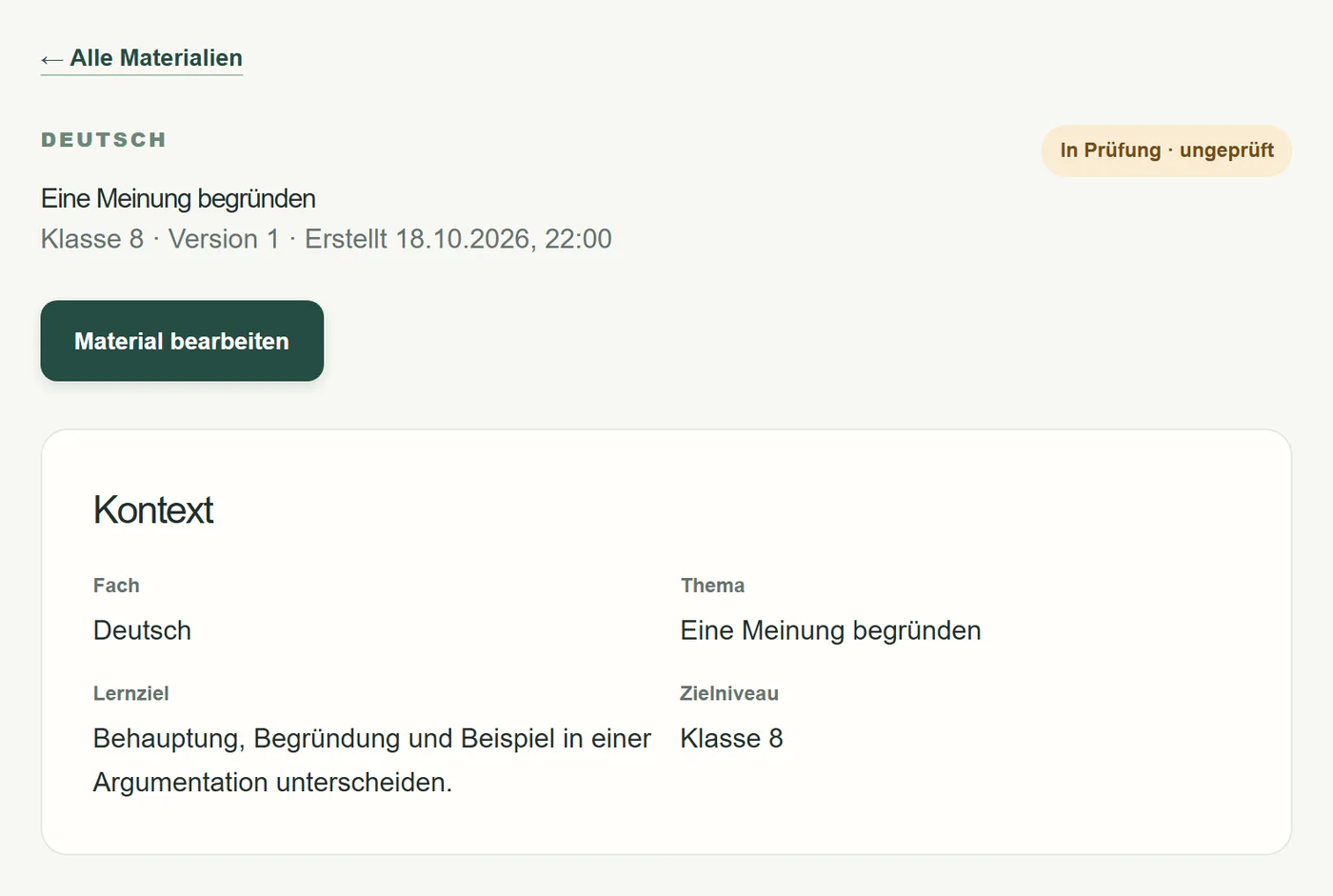
Prototype (German interface): the material “Eine Meinung begründen” for German, Year 8, with the status “In review · not reviewed” and its teaching context of subject, topic, learning objective and level.
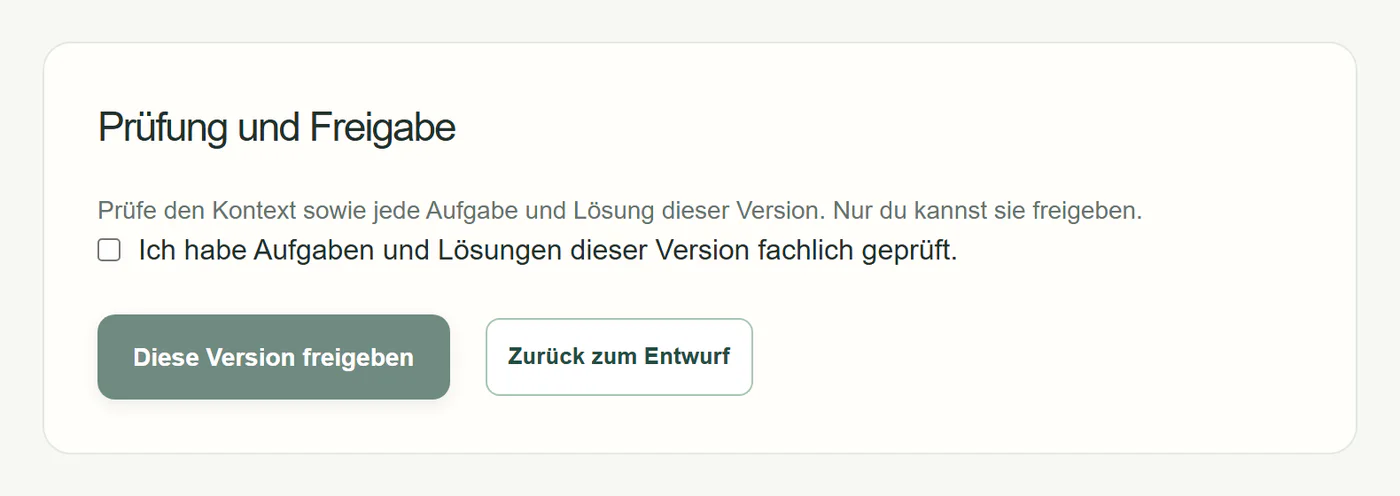
Prototype (German interface): the “review and approval” panel with the note “only you can approve it”, a confirmation that tasks and answers have been reviewed, and the button “approve this version”.
  1. Every draft is marked as not reviewed.Kept separate from approved material in the library.
  2. Approval only after explicit review.Saving is not approving; each approval applies to exactly one version.
  3. Export only from the approved version.PDF or DOCX, tasks and answers separate.
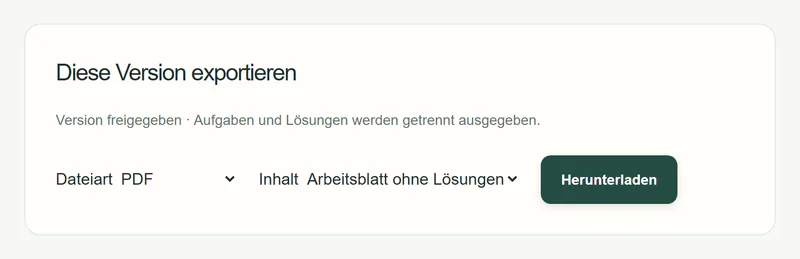
Prototype (German interface): exporting the approved version as PDF, worksheet without answers, with a download button.

The real interface, captured in a local test instance with fictitious example data and simulated AI. The app is currently moving to the Teachcraft design, and its interface is in German.

In the prototype

Works today

  • Worksheet and answer sheet as an AI draft from subject, topic, year and objective
  • Editing, review and explicit approval by the teacher
  • Library with drafts and approved versions
  • Export as PDF and DOCX
  • Differentiation into foundation and extension (internal tests)
  • Optional curriculum reference, starting with BW · Gymnasium · Maths 5/6
In development

Being built now

  • Library by school year, class, subject and unit
  • Year planning from the curriculum, also mid-year
  • Lesson planning with phases and timing
  • Research with labelled sources
  • Marking support without automatic grades
  • Your teaching style as visible rules
Research

Long-term direction

  • Open AI models specialised for teaching
  • Curricula of further states, school types and subjects
  • Operation on infrastructure in Germany or the EU
  • Evaluation together with teachers

Teacher first

For teachers first. Built with teachers.

Teachcraft is deliberately for teachers. Pupil accounts, pupil data and automatic grading are not part of the product.

  • The teacher decides

    Nothing the AI suggests takes effect without explicit approval.

  • No pupil data

    Development and testing use fictitious data. Pupil accounts are not planned.

  • AI is labelled

    Drafts, suggestions and AI conclusions are marked as such – never as “reviewed”.

  • No automatic grades

    Even in marking, Teachcraft only makes suggestions. Assessment stays with the teacher.

  1. Done

    Workflows understood

    Teachers’ workflows analysed and prioritised.

  2. Done

    Working prototype

    Materials, approval, export and differentiation run internally.

  3. Now

    Teacher-first build-out

    Year plan, lesson, research, marking and style – prompted by a teacher’s feedback.

  4. Next

    Tests with teachers

    With their own teaching content, without pupil data.

  5. Then

    School pilot

    Only after a data protection review with the school.

Teacher, department or school leader?

We are looking for teachers and schools who want to shape Teachcraft early. It starts with a conversation – no contract and no pupil data.

Request a pilot conversation

AI & research

Specialised AI for education.

Every AI function in Teachcraft is a registered, tested operation; the model behind it can be swapped. In the long run we want models that are specialised for teaching and can be run in Germany.

Our research direction (German)

  1. 06

    Teachcraft AI layer

    Registered operations, fixed schemas, approval by the teacher

    In the prototype
  2. 05

    Adaptation

    Fine-tuning for teaching tasks

    Research
  3. 04

    Teacher context

    Style, unit, earlier materials

    In development
  4. 03

    Curriculum grounding

    Official entries with source and date

    In the prototype
  5. 02

    Evaluation

    Versioned rubrics and test cases

    In the prototype
  6. 01

    Foundation model

    Swappable; external today, open in future

    Research

Team

Four founders. One product.

KM³ is run by four students of business informatics and related subjects. We build Teachcraft ourselves – interface, AI layer and infrastructure.

  1. Portrait of Florian Maier Florian Maier Founding team
  2. Portrait of Helios Meisner Helios Meisner Founding team
  3. Matteo Kalmund Founding team
  4. Portrait of Johannes Baron von Manteuffel Johannes Baron
    von Manteuffel
    Founding team

We say openly what already works and what does not yet. Every school that talks to us should be able to rely on that.

Also

What else KM³ offers.

  • AI workshops for schools

    Practical training for teaching staff – the way into AI in everyday school life.

    Für Schulen (German)
  • AI solutions for companies

    Clearly scoped projects: AI and automation inside existing processes.

    Für Unternehmen (German)
  • Digital public administration

    Forms, approvals and recurring processes digital instead of on paper.

    Für Verwaltungen (German)
  • Why these pages are German

    These pages are written in German, because the schools, companies and public bodies we work with are in Germany. Write to us in English any time.

Let’s talk about Teachcraft.

You would like to see Teachcraft, give feedback as a teacher, discuss a pilot at your school or request an AI workshop? Write to us – we reply within two working days. Other AI projects are welcome too.

Required fields are marked with *.

One to three sentences are enough, for example school type, subjects and what interests you.

More details — optional

e.g. “after the autumn break” or “still open”.

How do you prepare lessons today, what takes the most time?

How would you know it was worth it?

e.g. “Tuesdays after school” or “week 45”.

Prefer to write directly? info@kmcubed.de

Request a pilot