Teachcraft
The AI workspace for teachers.
From the curriculum through the year plan and the single lesson to the reviewed worksheet – in one connected system. AI suggests, the teacher decides.
As of October 2026
What runs today – and what does not yet.
The product is not yet publicly available. The prototype runs internally with fictitious data; we are preparing first tests with teachers. Every feature on this page carries its status.
Works today
- Worksheet and answer sheet as an AI draft from subject, topic, year and learning objective
- Editing, review and explicit approval by the teacher
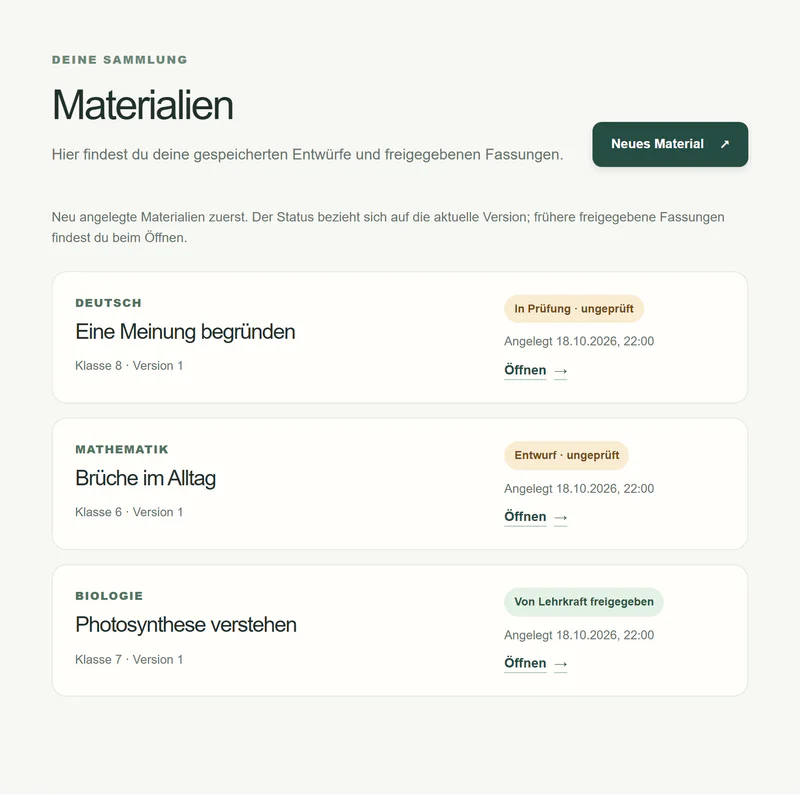
- Library with drafts and approved versions
- Export as PDF and DOCX, tasks and answers separately
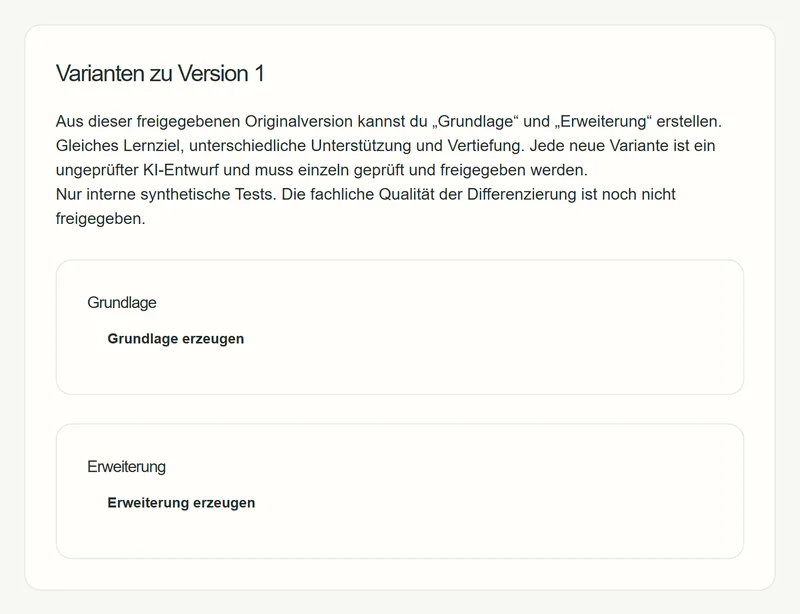
- Differentiation into foundation and extension (internal tests)
- Optional curriculum reference, starting with BW · Gymnasium · Maths 5/6
Being built now
- Filing by school year, class, subject and unit
- Year planning from the curriculum, also mid-year
- Lesson planning with phases, timing and grouping
- Research with labelled sources
- Marking support without automatic grades
- Teaching style as visible, confirmed rules
Long-term direction
- Open AI models specialised for teaching
- Curricula of further states, school types and subjects
- Operation on infrastructure in Germany or the EU
- Evaluation together with teachers
Workspace
Everything in its place – not in folders on a laptop.
School year, class, subject, unit, lesson, material: the workspace organises teaching the way it actually happens. If you start mid-year, you file what you already have under “No class yet” and sort it later.
In the prototypeToday: the library
In developmentNext: filing by class and unit
- School year 2026/27
- Class 7b · Maths
- Unit: Terms
- Unit: Equations
- Lesson 14 Jan – Rearranging equations
- Worksheet · approved
- Answer sheet · approved
- Class 9a · Physics
- No class yet – 14 files from last year
A year plan from the curriculum – even mid-year.
Choose state, school type, subject and year, and Teachcraft suggests units across the school year, each with a time span, learning objectives and a curriculum reference. Not starting in September? Pick where your class currently is.
Try it: choose a starting month or extend “Equations” by two weeks – the plan moves along and tells you where it gets tight.
In the prototype today: an optional curriculum reference from a small, traceable catalogue, starting with Baden-Württemberg · Gymnasium · Maths, Years 5/6, with a link to the official source. No material is presented as curriculum-compliant.
“Equations” +2 weeks. The following units move back; “Triangles” gets tight – please check.
A learning objective becomes a lesson.
A few inputs produce an editable lesson plan: phases, minutes, grouping and notes. The lesson knows its unit, its curriculum reference and – if wanted – the teacher’s style.
- Every phase can be moved, shortened or replaced.
- The matching material is created from the lesson, again as a draft.
- Without a year plan, the lesson works with a topic and learning objective entered by hand.
- 0–5StarterA balanced scale: what changes when both sides change equally?Whole class
- 5–15InputRearranging rules on one exampleWhole class
- 15–30PracticeGraded tasks 1–6, with checkingIndividual work
- 30–40ReviewCompare approachesPairs, then whole class
- 40–45PlenaryKey rule and check in exercise booksWhole class
Research with evidence instead of twenty tabs.
Research searches ahead, filters out outdated and promotional content and summarises what is relevant for the lesson. Every statement says what it is based on: one source, a summary of several sources or a conclusion drawn by the AI.
- Sources with publisher, type and date.
- What is filtered out stays visible – with a reason.
- AI conclusions are never disguised as sources.
“I need reliable material on renewable energy for Year 8.”
- 1Germany’s electricity mix: data and chartsSample Institute for Energy Systems · report · 2026Source
- 2Teaching unit on wind power, Years 7–9Sample State Media Centre · teaching materialSource
- 3Pupils’ ideas about energySample Physics Education Journal · articleSource
- –An energy supplier’s advice pagefiltered out: commercialFiltered
- –Energy link collectionfiltered out: from 2009Filtered
- [1][2]Charts on the electricity mix and a wind power experiment fit the objective.Summary
- [3]Common misconception: energy gets “used up” – address it in the starter.Source
- AISuggestion: start with the electricity meter at home.AI conclusion
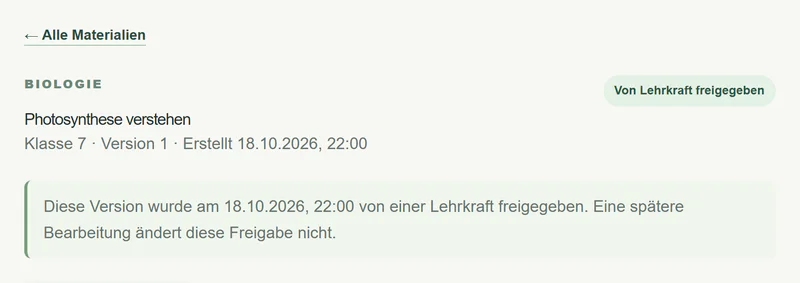
Materials start as drafts. Only the teacher can approve them.
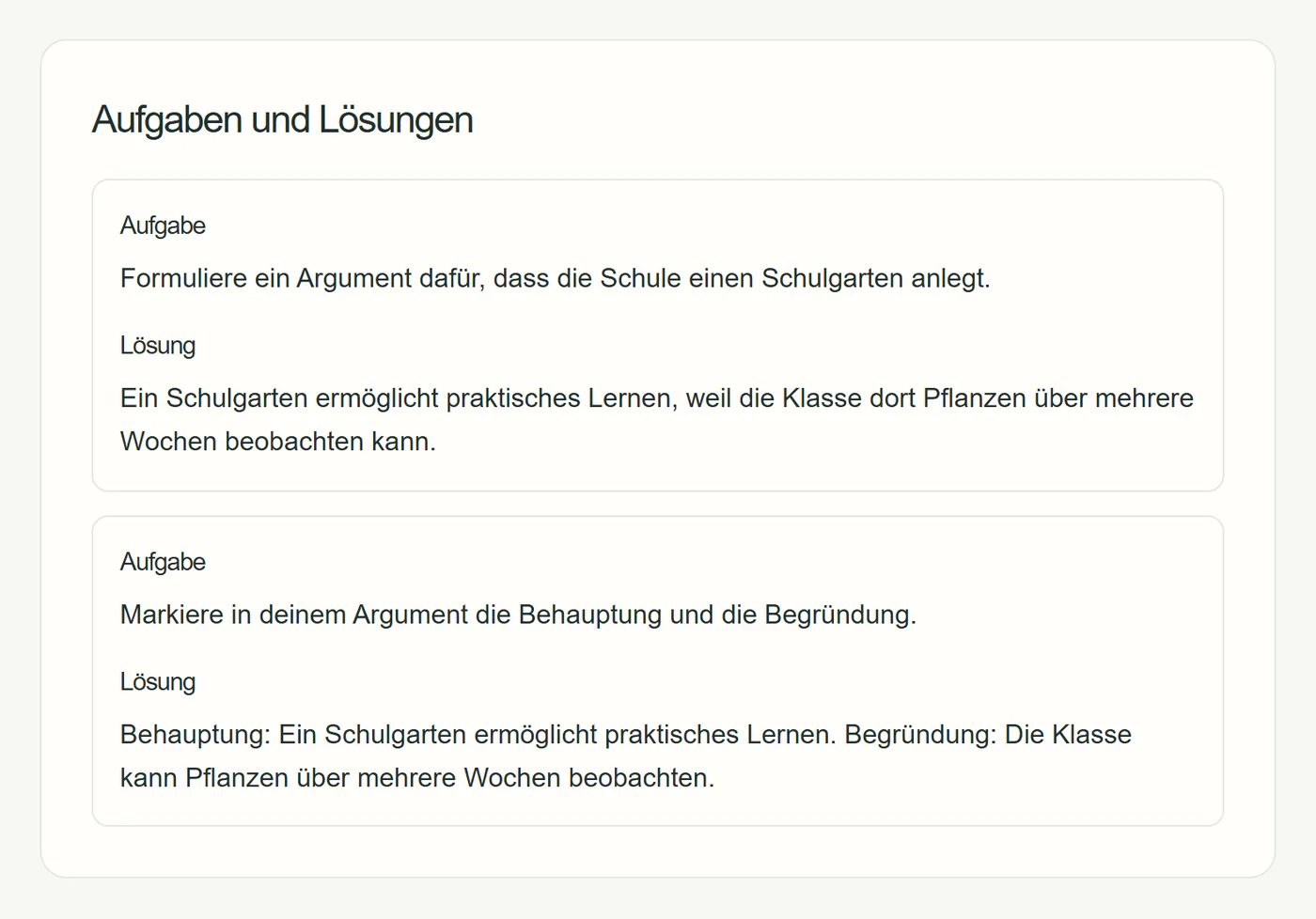
This is the core that already runs today – shown here in real captures from the prototype. Saving is not approving: every approval is a separate, explicit step and applies to exactly one version.
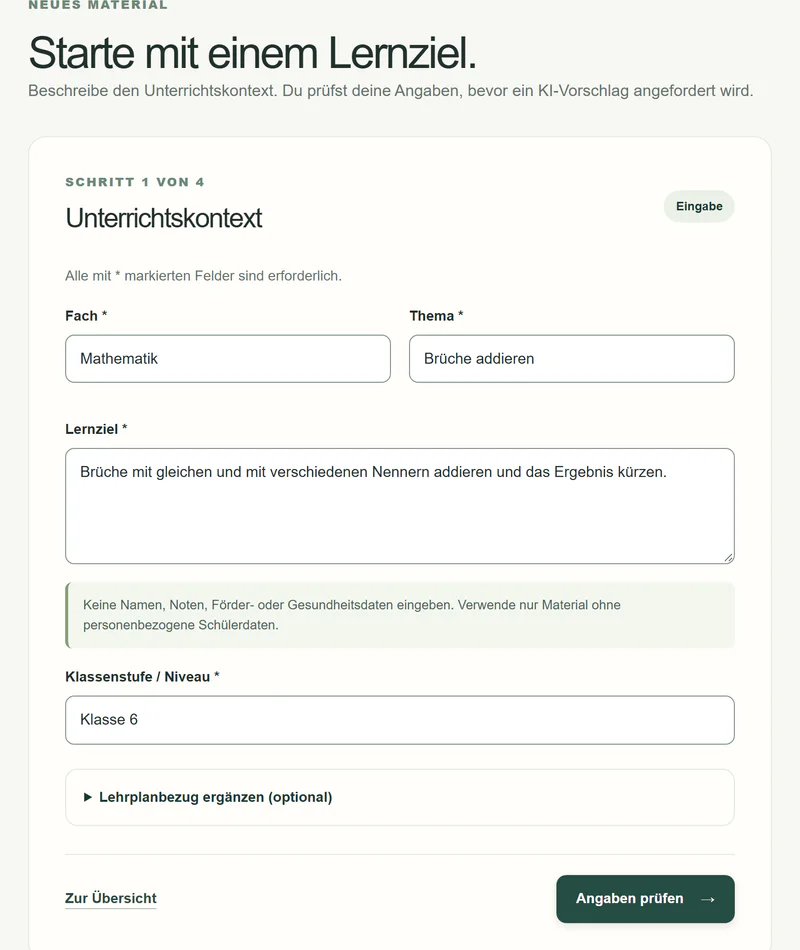
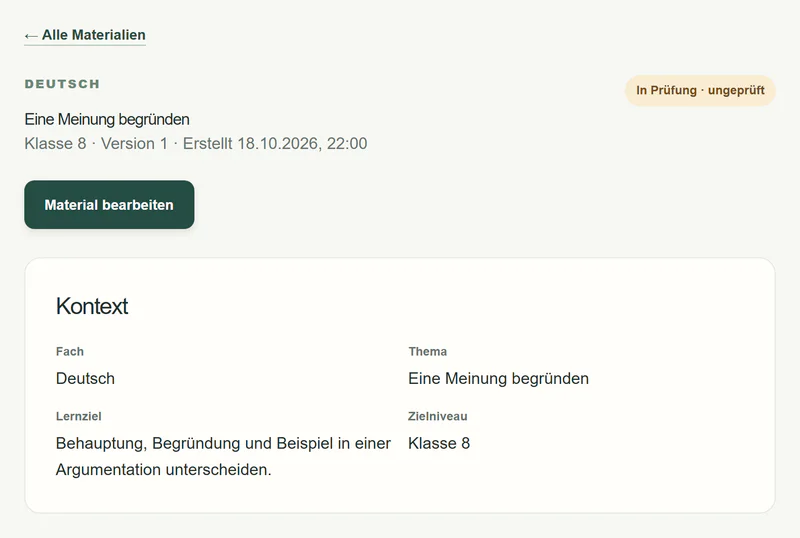
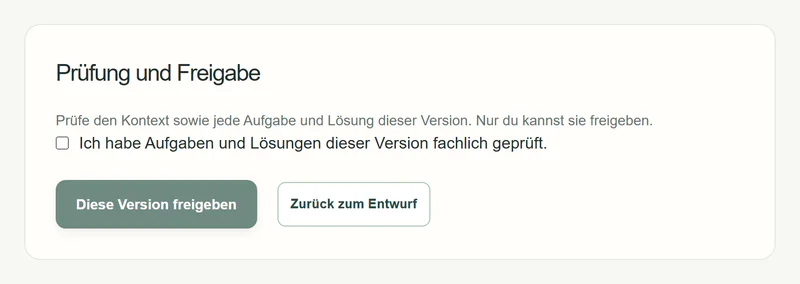
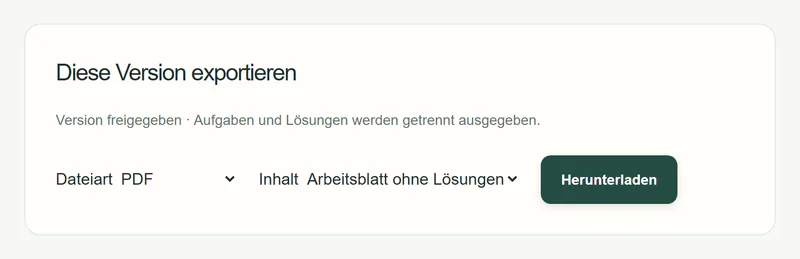
Captured in a local test instance with fictitious sample data and simulated AI. The interface is in German and is currently moving to the Teachcraft design.
Differentiation: same objective, different paths.
An approved version can be turned into “foundation” and “extension”: the same learning objective with different levels of support and depth. Each variant is its own AI draft and is reviewed and approved individually.
- Variants are only created from an approved original.
- No bulk approval – each variant on its own.
- We are currently checking the subject quality internally.
Marking with findings – and no automatic grade.
Add the task and the mark scheme, upload the work: the system flags possible mistakes in the margin, suggests feedback and explains why. The teacher accepts, edits or rejects each finding individually.
- No automatic grades – assessment stays with the teacher.
- The feedback on each piece of work goes to the teacher, not directly to pupils.
- Developed and tested only with fictitious work; real pupils’ work only after a data protection review.
1/3 + 1/4 = 2/7
Task 3
2/5 + 1/10 = 4/10 + 1/10
= 5/10 = 1/2
Numerators and denominators were added separately.
Feedback: First bring both fractions to the denominator 12.
Reason: 1/3 + 1/4 = 4/12 + 3/12 = 7/12; the work says 2/7.
Complete working, simplified result – praise it.
Your teaching style – visible, and only if you want it.
What a teacher says about their teaching, or keeps doing the same way, can be suggested as a rule. Only what the teacher confirms is used. No hidden profile: every rule is visible, editable and deletable.
Try it – switch rules on and off, confirm or reject the suggestion. Nothing is saved.
Only confirmed rules are used.
Safety and responsibility
Built for teachers who carry responsibility.
The teacher decides
Nothing the AI suggests takes effect without an explicit decision. There is no bulk approval and no silent acceptance.
No pupil data
No pupil accounts, no names, no performance profiles. Development and testing use fictitious data only.
AI is labelled
AI content is called a draft or a suggestion – never “reviewed” or “curriculum-compliant”.
No automatic grades
Marking support, too, only makes suggestions.
Swappable model
An AI layer of our own with registered functions; the language model behind it can be changed.
Only what is needed
Only what a function needs is sent to the model. Logs contain no teaching content.
Sources, not assertions
Curriculum references and research show their basis instead of promising compliance.
Open about the status
The review for use in schools is still pending. It is a precondition for any school pilot.
Roadmap
Seven work packages, one workspace.
Since October 2026 we have been building Teachcraft around what a teacher experiences over a school year. Each package works on its own and gets stronger with the others.
- A
Workspace and filing
School year, class, subject, unit, lesson, material – and “No class yet”.
- B
Curriculum and year plan
Units based on the state curriculum, starting mid-year if needed.
- C
Lesson and material
A lesson plan with phases and minutes, and the material that follows from it.
- D
Marking support
Findings in the margin, feedback on each piece of work, no grade.
- E
Teaching style
Confirmed rules that apply everywhere.
- F
Research and sources
Pre-filtered, labelled information for the lesson.
- G
Design system
A calm, accessible interface – on a tablet, too.
- Then
Tests and pilot
First teachers with their own content, then schools after a data protection review.
Frequently asked questions
Questions about Teachcraft.
Is Teachcraft available yet?
Not publicly. Teachcraft runs as a prototype in an internal test environment with fictitious data. Next, individual teachers will test it with their own teaching content; a school pilot will only follow after a data protection review with the school.
Who is Teachcraft for?
For teachers. Teachcraft supports planning, research, creating materials and marking. Pupils have no access and no account of their own.
Does Teachcraft grade pupils’ work automatically?
No. The planned marking support suggests findings and feedback; the teacher accepts, edits or rejects each suggestion. Automatic grading is explicitly not planned.
Which curricula does Teachcraft know?
The prototype starts with an extract of the Baden-Württemberg curriculum: Gymnasium (academic secondary school), maths, Years 5 and 6, each with a link to the official source. Further states, school types and subjects will follow. Teachcraft never claims that a material complies with the curriculum – it shows which reference was used.
What data does Teachcraft process?
The teacher’s teaching content, no pupil data. In development and testing we work exclusively with fictitious data. Only what a function actually needs is sent to the AI model.
Which AI is behind Teachcraft?
Teachcraft uses its own AI layer with registered, tested functions. The language model behind it can be swapped; the internal prototype uses models from external providers. In the long run, we are working towards specialised open models that can be run in Germany or the EU.
What does Teachcraft cost?
There is no pricing model yet. We are talking to teachers and schools first about what Teachcraft has to deliver in everyday teaching.
How can my school take part?
Write to us using the contact form. It starts with a conversation – no contract and no pupil data.
Shape Teachcraft early.
Teachers, departments and school leaders: tell us how you prepare lessons. We show you where Teachcraft stands and work out together whether an early test makes sense.